


Remind: School Communication
4.371.80K Reviews
App Specs
- Version
- 15.6.4
- Updated On
- License
- Free
- Downloads
- 10,000,000+
- Developer
- Remind101
- Categories
- Education
- Platform
- Android, iOS
Screenshots
 Analysis by AppCompare
Before I install a school communication app, I want to know whether it will make ordinary school-day logistics clearer or simply add another stream of notifications. Remind: School Communication is aimed at keeping teachers, families, and students connected around classes and school updates. I see its main value in giving those conversations a more purposeful home than a crowded email inbox, especially when a quick reminder can prevent a missed deadline or event.
Connecting the School Community
First things first, the main vibe I get from Remind: School Communication is that it’s all about bringing the school community together. Imagine having all the important school updates, assignments, and announcements at your fingertips. No more digging through piles of papers in your kid's backpack, right?
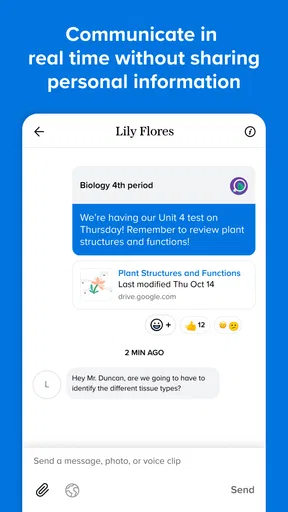
The app is essentially like a hub where teachers, parents, and students can connect and communicate. It’s super handy for teachers who need to send out quick reminders or updates about assignments and class events. And let’s be real, who doesn’t love getting a notification instead of having to remember to check their email?
What to Expect from a School Communication App
Remind is an education app from Remind101, and the name describes its practical focus: keeping school communication within reach. It is free, has an Everyone age rating, and has been available since October 5, 2012. Its current version is 15.6.4, and it requires Android 9 or later on Android devices. The app has a 4.3 average from around 227,000 ratings, with more than 10 million installs. Those figures suggest it has become a familiar option for many school communities, though the day-to-day usefulness still depends on whether your school and classes use it.
I would think of it as a communication layer, not a full replacement for a school’s learning platform or official records. A teacher may use a class message to flag a change or point families toward something students need to do, while grades, longer course materials, and formal policies may still live elsewhere. That distinction helps set expectations: Remind is most useful when the school has made it part of its routine, rather than when one family tries to use it in isolation.
Compared with ordinary email, class-based messages can make it easier to see which school group a notice belongs to and respond in context. Compared with a general family group chat, communication is more clearly tied to school relationships and classes. But it does not magically solve inconsistent communication: if a teacher mainly uses email or another school portal, you may still need to check those channels too.
Getting Started: Easy Peasy
Getting started with Remind is a breeze. You can download it on both Android and iOS, which is perfect because it means no one’s left out. Once you’ve got the app, signing up is straightforward. You just need to punch in your school code, and bam! You’re in.
Worth Reading Before You Choose

EA SPORTS FC Mobile 26 Is a Bigger Football Game, but It Takes Time

Flipboard Shows What News Apps Must Do Beyond the Feed

Switching to Android Auto Means Rethinking Your Driving Routine

Google Calendar Makes a Crowded Week Easier to Manage

Ludo King Makes the Most of the Minutes Between Plans

Baby Panda World Brings Quick Play to Modern Phones, but Its Game Library Feels Busy
Teachers can set up their classes in a jiffy, while parents and students just need to jump in using the class code. It’s all very user-friendly, which is great because no one has time to wrestle with tech when trying to get stuff done.
For a first-time user, the most reassuring approach is to start with the invitation or code supplied by the school or teacher, rather than searching for a class at random. Check that you have joined the right class before relying on its messages; a child may have different teachers, and a household may need to follow more than one class or school. If you are a teacher, it is worth deciding how you will name and organize classes before inviting families, so a parent with several children can tell which updates belong to which group.
One useful habit is to agree at home who will monitor each class. If two caregivers both assume the other person saw an announcement, a notification can still be missed in practice. A simple division—one adult watches the weekly class updates, while the other checks event messages—can make the app more dependable without turning it into another chore for everyone.
Features that Stand Out
Okay, let’s chat about some of the features that really make this app stand out. One of my favorites is the messaging feature. It allows for direct communication between teachers and parents or students. Plus, it’s all private and secure, so you don’t have to worry about your messages floating around the internet.
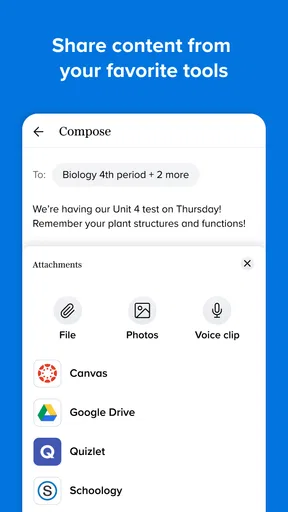
The app also supports file sharing, which is perfect for sending out study materials or receiving assignments. And if you’re juggling multiple kids in different schools, no worries! You can add multiple classes and get updates from each one without a hassle.
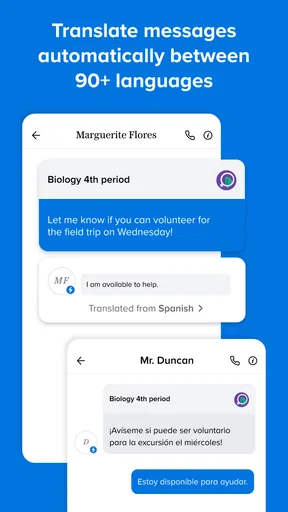
Another cool feature is the ability to translate messages into over 90 languages. This is a game-changer for families who speak a language other than English at home. It really opens up communication and ensures everyone is on the same page. Pretty neat, huh?
Those tools work best when used with a little care. For a file sent in a class conversation, I would check the class context before saving or forwarding it; otherwise, a useful handout can get separated from the instructions that explain it. With several children enrolled, treating the class name as part of the message—not just a label—helps avoid mixing up a schedule change for one child with another child’s homework.
Translation can lower a real barrier for families, but I would still read important details carefully, particularly dates, times, names, or instructions where a small wording difference matters. If a translated note is unclear, asking the teacher to clarify in a direct message is more sensible than guessing. The feature is a helpful bridge, not a reason to assume every nuance will always come across perfectly.
A realistic use case is a teacher sharing a reminder about an upcoming class event while also attaching a relevant file. A parent who checks the class thread can see the notice and its supporting material together, then ask a follow-up question in the same school context. That is more organized than hunting through a paper folder, a general chat, and separate email threads. It still depends on the teacher choosing to post there, so families should follow the communication method their school actually expects.
Common Confusion and Everyday Trade-Offs
The first thing that can confuse new users is the difference between having the app and being connected to a class. Installing it alone does not bring school messages into view; a teacher or school needs to provide the appropriate way to join. If the expected class is missing, I would first check the code and ask the teacher whether the class is using Remind, rather than assuming the app has failed.
Another point to keep in mind is that a notification is a prompt, not a complete organization system. Messages arrive alongside everything else competing for attention on a phone. I would make a small routine of opening the relevant class after receiving an important alert, especially when a message includes a file or follow-up detail. That quick check is less likely to leave an instruction half-read than relying on a notification preview.
There is also a trade-off between convenience and channel overload. Remind can make school communication easier to find, but it can feel like one more app if a school also relies on email, a learning platform, and printed notices. In that situation, ask which channel is authoritative for urgent changes and which is used for everyday reminders. The app is a stronger fit when teachers and families share that expectation; it is less useful if every important update is duplicated inconsistently across several places.
For privacy-minded families, I would keep messages focused on school matters and use the class communication space for the purpose it serves. It is convenient to contact a teacher directly, but sensitive family details are better handled thoughtfully rather than casually placed in a group context. The private messaging feature makes communication more targeted, while good judgment about what to share remains the user’s responsibility.
Who Benefits Most—and Who May Prefer Another Tool
I can see this being especially useful for parents who manage several school commitments, teachers who need a straightforward way to reach a class, and students who benefit from reminders arriving where they already check messages. It may also be valuable in multilingual households, where translated communication can make routine school updates easier to follow. The strongest case is a school community that has adopted it consistently and gives families clear instructions for joining.
On the other hand, a family whose school communicates reliably through one existing portal may not gain much by adding another channel. A student who needs a structured place for lessons, grades, and long-term assignment tracking may be better served by the school’s learning platform, with Remind used only for messages if required. Likewise, someone who prefers to keep all notifications off will need to check the app deliberately or may miss the convenience that makes it worthwhile.
For a first successful action, I would join one class, open its latest message, and make sure I can identify who sent it and which child or class it concerns. If there is a file, open it while the message is still easy to find. Then send a brief, relevant question only if something genuinely needs clarification. That small test shows whether the school’s workflow fits your needs before you depend on the app for every update.
My Personal Take
Now, here’s my two cents. I really dig how Remind keeps everyone in the loop without being overwhelming. It’s like having a friendly nudge to remind you what’s coming up, whether it’s a parent-teacher meeting or a homework deadline. Plus, the app's design is sleek and intuitive, which makes it easy to navigate.
However, like with any app, there can be a bit of a learning curve, especially for those who aren’t super tech-savvy. But once you get the hang of it, it’s smooth sailing.
My main recommendation is to treat it as a shared routine rather than a magic fix. Teachers can make messages easier to act on by keeping each class’s communication focused, and families can reduce confusion by checking the class label and keeping track of which caregiver handles which updates. If messages are frequent, a quick daily check may suit your household better than reacting to every alert as it appears. If communication is occasional, checking when a notification arrives may be enough.
Making It Part of the School Routine
When the app is working well for a family, its benefit is often small but concrete: fewer forgotten reminders, less uncertainty about where a class update came from, and a clearer route to ask a teacher a question. It will not remove every paper notice or replace every school system, and I would not expect it to. Its best role is to make the communication a school already sends easier to reach and respond to.
Before relying on it for a time-sensitive event, confirm that you have joined the right class and that you know where that class posts updates. If another caregiver also needs the information, decide whether they should join separately or whether you will share the important message at home. Those simple steps prevent the common problem of assuming that installing an app automatically means every adult in a household is informed.
Wrapping It Up
So, if you’re looking for a way to stay organized and connected with your school community, Remind: School Communication might just be the app you need. It’s accessible, efficient, and a real time-saver. Whether you’re a teacher trying to manage your classes or a parent needing to keep track of school events, this app could be a perfect fit.
I would recommend trying it when a teacher or school invites you to use it, then starting with one class and one real update. That gives you a low-pressure way to see whether messages, files, and translation are useful in your household. If your school already communicates through another system, ask how Remind fits alongside it before making it your only source for important information.
Ready to give it a go? You can find the download links for both Android and iOS on our website. Happy communicating!
Pros
- Streamlined communication with teachers.
- Real-time updates and notifications.
- User-friendly interface for all ages.
- Supports multimedia messages.
- Schedule messages for future delivery.
Cons
- Limited customization for notifications.
- Requires internet for full functionality.
- Some features need premium access.
- Occasional delays in message delivery.
- No offline message access.
FAQs for Remind: School Communication
What is Remind: School Communication and who is it for?
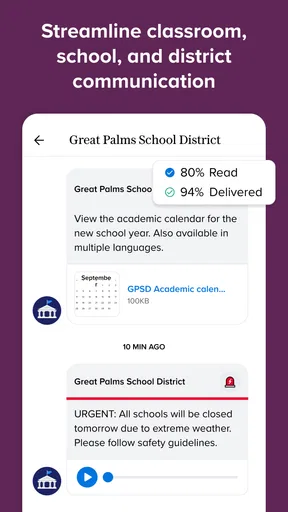
Remind is a communication platform designed for educators, students, and parents. It allows for seamless communication through messages, announcements, and file sharing. Its primary goal is to bridge communication gaps in educational settings, making it easier for teachers to reach students and parents effectively.
How does Remind ensure the privacy and security of its users?
Remind prioritizes user privacy and security by implementing strong encryption protocols. Personal contact information is never shared, and all communications are kept within the app. The platform complies with educational privacy regulations, ensuring that all data is protected and used responsibly.
Can Remind be used for purposes other than school communication?
Yes, while primarily designed for educational settings, Remind is versatile enough to be used for various group communication needs. Clubs, sports teams, and community organizations can also benefit from its features, enabling organized and efficient communication among members.
What features does Remind offer to enhance communication?
Remind offers a variety of features including direct messaging, group chats, scheduling announcements, and sharing multimedia files. It also supports integration with other educational tools and platforms, providing a comprehensive communication solution that adapts to the needs of different users.
Is Remind accessible on both Android and iOS devices?
Yes, Remind is available for both Android and iOS devices. It can be downloaded from the Google Play Store and the Apple App Store. The app is designed to work seamlessly across different devices, ensuring that users can stay connected no matter what platform they prefer.


